Bringing the Festival of Colors to Your Designs
There is an undeniable energy to the Indian festival of Holi. It is a celebration of spring, love, and the victory of good over evil, famously known as the festival of colors. But beyond the religious and cultural significance, there is a raw, visual explosion that defines the event. We are talking about clouds of powdered pigment—gulal—flying through the air, water balloons bursting with dyed water, and faces smeared with vibrant hues. It is chaotic, joyful, and incredibly dynamic. For designers, capturing that specific kinetic energy can be a challenge. Standard geometric typefaces or classic serifs often feel too rigid to convey that level of spontaneous joy.
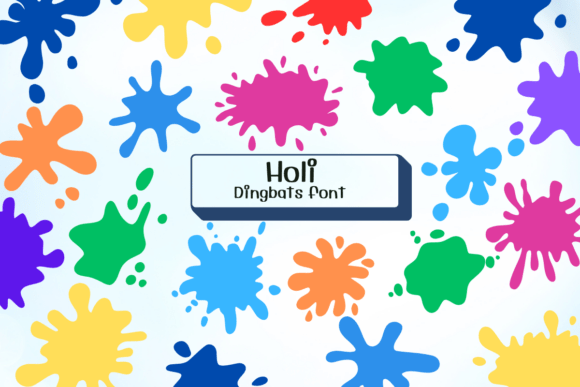
This is where the Holi Dingbats Font enters the conversation. It is not a traditional alphabet meant for writing sentences; rather, it is a curated collection of glyphs that function as digital art assets. By typing specific keys, you generate a variety of paint splatters, blobs, and abstract bursts of color. Think of it as a toolkit for mimicking the visual aftermath of a color fight. For creative professionals ranging from graphic designers to social media managers, this typeface offers a unique shortcut to adding texture, movement, and festive flair without needing to manually draw vector shapes or license expensive stock photography.
Understanding the Visual Style of Holi Dingbats
When we talk about a "dingbat" font in the context of modern typography, we are essentially discussing a font file that maps pictorial symbols to keyboard characters. The Holi Dingbats Font specifically focuses on the aesthetic of impact. The shapes included in this family are irregular, organic, and textured. They mimic the way pigment behaves when it hits a surface—scattered edges, density variations, and the occasional drip.
The personality of this font is unapologetically playful. It lacks the structure of a sans serif font and the elegance of a script font. Instead, it relies on chaos to create beauty. This makes it a distinct departure from the clean lines often associated with corporate branding. However, that "messiness" is intentional. In the world of visual communication, texture adds realism. A perfectly smooth circle looks digital and sterile; a jagged, textured blob looks tactile and real. For designers working on projects that require a human touch or a sense of celebration, the visual weight of these glyphs provides an immediate emotional cue.
Best Applications for Maximum Impact
The versatility of a specialized asset like this lies in how you layer it. Because the Holi Dingbats are essentially shapes, they function best as background elements, accents, or masks. Here are a few practical scenarios where this font shines:
- Party Invitations and Stationery: This is the most obvious use case. For a Holi party, a summer festival, or a child’s birthday bash, these dingbats can be used to create a border or a background pattern. Instead of a solid color background, you can arrange multiple splatter glyphs to create a textured, confetti-like effect.
- Digital Marketing and Social Media Graphics: In the fast-paced world of social media, stopping the scroll is paramount. A bold, colorful splatter can serve as a highlight behind a key word in an Instagram story or a Facebook ad. It draws the eye immediately to the focal point.
- Packaging Design: If you are working on packaging for food, art supplies, or children’s toys, these elements can add a splash of energy to the label design. Using the dingbats as spot UV elements or embossed textures on physical packaging can elevate the tactile experience of the product.
- Editorial Design and Blog Posts: Publishers and bloggers can use these shapes to break up long blocks of text or to illustrate articles about culture, art, and creativity. A subtle splatter in the margin can add visual interest without distracting from the main content.
Strategic Integration: Branding and Visual Hierarchy
Choosing a creative font like Holi Dingbats requires a strategic approach. You cannot simply throw splatters at a design and expect it to look professional. The key is understanding visual hierarchy and brand perception. If your brand identity is built on minimalism and strict order, this font might clash with your existing design assets. However, if your brand voice is energetic, youthful, innovative, or artistic, these elements can reinforce your message.
Consider the concept of contrast. A paint splatter looks most striking when placed against a clean background or paired with a highly legible, neutral typeface. For example, using a heavy, bold sans serif font for your headline allows you to use the Holi dingbats as an underline or a background burst behind the text. This pairing creates a balance between readability and excitement. The viewer can easily read the message, but they also feel the energy of the design.
Furthermore, these elements can be used to guide the viewer's eye. In web design, for instance, a bright, colorful blob can act as a visual arrow, pointing toward a "Buy Now" button or a "Sign Up" form. It is a subtle psychological nudge that uses color and shape to direct user behavior.
Practical Tips for Selection and Usage
Before incorporating the Holi Dingbats Font into your next project, it is worth taking a moment to evaluate the technical and aesthetic fit. Here is a checklist for creative professionals:
- Evaluate the Glyph Library: Open a character map or a glyph panel in your design software to see exactly what symbols are included. Does the font offer a variety of sizes? Are there different types of splatters, or are they all similar? A good premium font should offer enough variety to create a dynamic composition without looking repetitive.
- Check for Scalability: As these are vector-based glyphs, they should scale up and down without losing quality. Test the shapes at very large sizes (for posters) and very small sizes (for icons) to ensure the details remain crisp and the jagged edges don't turn into muddy pixels.
- Color Application: Remember that these are single-color shapes by default. To get that authentic Holi look, you will need to apply gradients or multiple colors. In Adobe Illustrator or Photoshop, you can easily change the fill color of the font. Try using a palette of 3 to 5 vibrant, contrasting colors to mimic the festival vibe.
- Commercial Licensing: This is a critical step often overlooked by entrepreneurs and small business owners. If you are using these assets for a client logo, a product you sell, or marketing materials, ensure you have the correct commercial license. "Free for personal use" does not cover business applications. Always verify the terms to avoid legal issues down the road.
Beyond the Festival: Versatility in Modern Design
While the name suggests a specific cultural event, the utility of abstract paint splatters transcends the Holi festival. In the realm of abstract art and grunge design, these shapes are timeless. They can be used to create textures for website backgrounds, overlays for photography, or assets for video game design.
For content creators and YouTubers, these dingbats can be imported into video editing software to create custom transitions or lower thirds. The organic nature of the shapes contrasts well with the rigid grid of digital video, adding a layer of humanity to the content.
Ultimately, the Holi Dingbats Font is a reminder that typography is not just about legibility; it is also about illustration. It bridges the gap between a typeface and a design asset. By treating these characters as graphic elements rather than letters, you unlock a world of creative possibilities that can bring joy, color, and movement to any project you undertake. Whether you are designing a wedding invite for a spring celebration or a bold header for a tech startup, having a tool that captures the essence of the festival of colors can be the secret weapon that sets your work apart.