Why Dot Marker is the Best Font for Teaching ABCs
If you have ever sat down to create a custom worksheet for a toddler or a preschooler, you know the challenge. You want something that is visually stimulating but also educational. You need a layout that encourages fine motor skills without the frustration of staying inside rigid lines. This is exactly where the Dot Marker font changes the game. It isn't just a typeface; it is a functional tool designed specifically for early childhood education, turning a standard computer into a content creation studio for parents and educators.
Understanding the Playful Character of Dot Marker
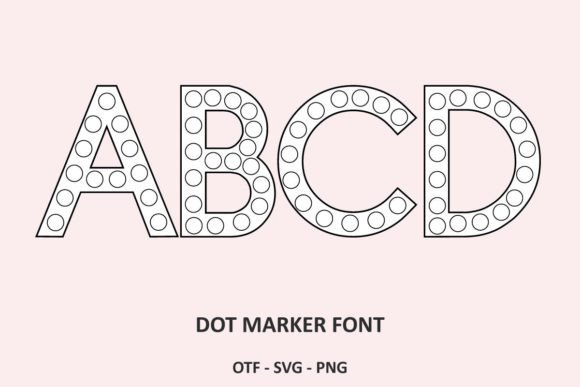
At its core, Dot Marker is a display font that mimics the look of a physical bingo dauber or "do-a-dot" marker. The visual characteristics are distinct: the strokes are not solid lines but rather a series of perfectly aligned, high-contrast circles. This unique structure gives the font a playful, tactile personality that resonates immediately with children. It bridges the gap between digital design and physical activity. When a child sees this text, they don't just see a letter; they see a path of dots waiting to be filled in.
The appeal lies in its simplicity and the "instant worksheet" capability. Unlike a standard sans serif font or a script font, which are designed for reading fluidity, Dot Marker is designed for interaction. It provides a clear boundary for the child while maintaining a fun, approachable aesthetic. For a graphic designer or a content creator, this font offers a way to generate custom educational materials that look professional and polished, rather than hand-drawn or amateurish.
Real-World Applications for Creators and Educators
While the primary audience is parents and preschool teachers, the utility of Dot Marker extends to various niches within the creative industry. If you are a small business owner selling educational resources on platforms like Etsy or Teachers Pay Teachers, this font is an indispensable design asset. It allows you to rapidly prototype and produce packaging design elements for activity kits or editorial design components for parenting magazines.
Here are a few practical scenarios where this font shines:
- Printable Activity Sheets: Create endless variations of alphabet tracing pages. You can adjust the font size to create large motor skill practice or smaller sizes for more advanced learners.
- Party Decorations: For a child’s birthday, use the font to create custom banners, cupcake toppers, or name tags that fit a specific color theme.
- Brand Identity for Kid-Focused Businesses: If you are launching a daycare, a toy shop, or a children's blog, Dot Marker can serve as a secondary display font to add personality to your logo design and headers.
- Social Media Graphics: Use the font to create engaging Instagram stories or Pinterest pins that promote learning activities. The visual "dots" are highly recognizable and stop the scroll.
Strategic Design and Pairing Considerations
From a modern typography perspective, using a specialized font like Dot Marker requires a bit of strategy to maintain visual hierarchy and readability. Because it is a premium font with a very specific style, it should rarely be used for body text. Its strength lies in headlines, titles, and the actual activity prompts.
When integrating this into a project, consider your font pairing. To balance the playful energy of the dots, pair it with a clean, geometric sans serif font for instructions. For example, if you are making a "Find the Letter A" worksheet, use Dot Marker for the large "A" and a font like Montserrat or Open Sans for the instruction text "Color the dots." This contrast ensures that the child (and the parent) can read the instructions clearly while the focal point remains the interactive element.
Evaluating the fit of this font involves looking at the "x-height" and the counter-spaces (the empty space inside the letters). In Dot Marker, the counters are essentially empty circles, which is perfect for coloring but can look visually "heavy" if used in long paragraphs. Keep the usage isolated to specific design elements to maintain a clean layout.
Technical Workflow and Customization
For the hobbyist or designer, working with Dot Marker is straightforward. Once installed, it functions like any other typeface on your system. You can use it in Adobe Illustrator, Photoshop, Canva, or even Microsoft Word. The key to getting the most out of this font is color application.
Most versions of this font come in a single style, but the versatility comes from your design software. You can easily change the fill color of the text to match specific learning themes—blue for water units, green for plants, or red for apples. This ability to instantly recolor the "dots" allows you to create cohesive brand identity assets for educational materials without needing to draw individual circles.
Furthermore, check the commercial licensing of the font you download. If you are a blogger or marketer creating a free download to grow your email list, ensure your license permits free distribution of the resulting PDF. Most premium licenses cover this, but it is always best practice to verify.
Enhancing Engagement Through Design
The ultimate goal of using Dot Marker is to facilitate learning through engagement. In web design or digital products, you can use this font to create "color-by-letter" games on tablets. The brand perception shifts from "generic educational content" to "custom-crafted learning experience" when you use a specialized creative font like this.
It provides a sense of consistency across your entire curriculum or product line. Whether you are printing worksheets or displaying them on a screen, the visual language remains the same. This consistency builds trust with your audience, whether they are parents downloading a freebie or a client hiring you for a full brand identity package for a preschool.
In the end, Dot Marker is more than just a collection of circles. It is a bridge between digital design and physical play. By incorporating this font into your toolkit, you equip yourself to create high-value, engaging content that supports early childhood development while maintaining the professional standards of modern graphic design.